
Security dossier v8.52
Trust, security and ethics
Evidence-based guidance on download integrity, kernel driver behavior, licensing compliance, and privacy.
Evidence summary
Key trust indicators
- Publisher
- REALiX s.r.o., Czech Republic. Developer since 1995. Digitally signed executables and kernel driver.
- Driver signature
- hwinfo64a.sys carries a valid Authenticode certificate. Required for low-level sensor access on Windows.
- No bundled software
- Clean installer with no adware, browser toolbars, or third-party payload. Single-purpose diagnostics tool.
- Local data
- Sensor data stays on your machine unless you configure email alerts or Pro remote monitoring.
Policy
Legal usage
HWiNFO64 and HWiNFO ARM64 are licensed as freeware for personal and non-commercial use. You may install and run the software on home computers, personal gaming systems, and private workstations without charge.
Commercial use in any revenue-generating, business, educational, or IT-managed environment requires a valid HWiNFO Pro license. The non-Pro build permits a 14-day evaluation period for commercial testing before purchase is required.
Redistribution, repackaging, or mirroring of HWiNFO installers without permission from REALiX s.r.o. is prohibited. Direct users to the download page on this site.
- OK Personal diagnostics on your own hardware
- OK Non-commercial overclocking and benchmarking
- OK 14-day commercial evaluation (non-Pro build)
- REQ Pro license for repair shops, IT departments, and business use
Compliance checklist
- Confirm your use case is personal or covered by Pro
- Download only from verified sources on this site
- Verify REALiX s.r.o. digital signature before running
- Do not redistribute copied installer files
- Purchase Pro before the 14-day commercial eval expires
Ethics
Ethical statement
HWiNFO is designed exclusively for hardware diagnostics, inventory, and monitoring. It reads sensor data and system configuration through documented Windows APIs and signed kernel drivers. It does not intercept network traffic, capture keystrokes, or modify system files beyond its own configuration and driver installation.
This site at hwinfo.co is an independent resource that provides download guidance and documentation. It is not operated by REALiX s.r.o. We encourage users to verify publisher signatures, respect licensing terms, and report suspicious repackaged copies.
Responsible use means running HWiNFO only on systems you own or have authorization to diagnose, respecting commercial licensing requirements, and sharing sensor logs only with parties who need them for legitimate support purposes.
Transparency
Source transparency
HWiNFO is proprietary software developed and maintained by REALiX s.r.o. The source code is not publicly available and HWiNFO is not open source software. This closed development model allows direct support for new hardware platforms as vendors release updated microcode, ACPI tables, and sensor interfaces.
Transparency is provided through digitally signed binaries, published version changelogs, and a long public track record since 1995. Users can inspect behavior through exported reports, sensor logs, and Windows driver verification tools.
This site documents product behavior based on verified release notes and community-tested diagnostics workflows. For feature details see the features page.
What you can verify locally
- Digital signature
- Authenticode certificate chain under file Properties
- SHA-256 hash
- Compare published checksums with Get-FileHash in PowerShell
- Network activity
- No outbound connections unless email alerts or Pro remote monitoring is enabled
- Version string
- File Properties should report v8.52 and build date 2026-08-25
No malware policy
HWiNFO does not contain viruses, trojans, ransomware, cryptominers, or spyware. The installer delivers only the HWiNFO executable, kernel driver, and required support files. No browser extensions, registry hijacks, or background data exfiltration are included.
Antivirus detections are overwhelmingly heuristic false positives triggered by the signed kernel driver hwinfo64a.sys. The driver temporarily loads with elevated privileges to read hardware registers, a pattern that some scanners associate with unwanted software despite legitimate use.
If your scanner quarantines HWiNFO, verify the REALiX signature before restoring the file. Follow the antivirus recovery guide or read the FAQ security section.
Driver
Kernel driver explained
hwinfo64a.sys is a kernel-mode driver signed by REALiX s.r.o. It provides access to hardware registers, SMBus controllers, embedded controllers, and ACPI tables that user-mode applications cannot read directly. Without this driver, many temperature, voltage, and fan sensors would display N/A.
The driver is extracted to a temporary location during operation and removed when HWiNFO closes, unless you choose to install it persistently through the setup wizard. Administrator privileges are required for initial driver installation.
- Why kernel mode?
- Direct hardware register access for accurate sensor polling at intervals as low as 500 ms.
- Why AV flags it?
- Privileged driver loading and temp file extraction match heuristic patterns used by security scanners.
- Memory Integrity impact
- Core Isolation can block EC access. Update HWiNFO and see the Memory Integrity guide.
Driver load sequence
1. HWiNFO64.exe starts (user mode)
2. Extract hwinfo64a.sys to temp
3. Verify Authenticode signature
4. Load driver via Service Control Manager
5. Read SMBus / EC / ACPI registers
6. Return sensor values to UI
7. Unload driver on exit (default)
Integrity
Download verification workflow
Follow this sequence before running any HWiNFO installer. Each step adds a layer of confidence that the file has not been tampered with.
Full verification instructions are on the download page. For publisher verification steps see safe download guide.
Licensing
Commercial license
HWiNFO Pro is required for any commercial, business, or revenue-generating use. This includes repair shops, system integrators, IT departments, managed service providers, educational institutions using HWiNFO in lab environments, and reviewers publishing sponsored hardware content.
The free non-Pro build includes a 14-day evaluation window for commercial testing. After evaluation, continued commercial use without a Pro license violates the terms of use.
| Feature | Free (non-commercial) | Pro (commercial) |
|---|---|---|
| Core diagnostics | Full access | Full access |
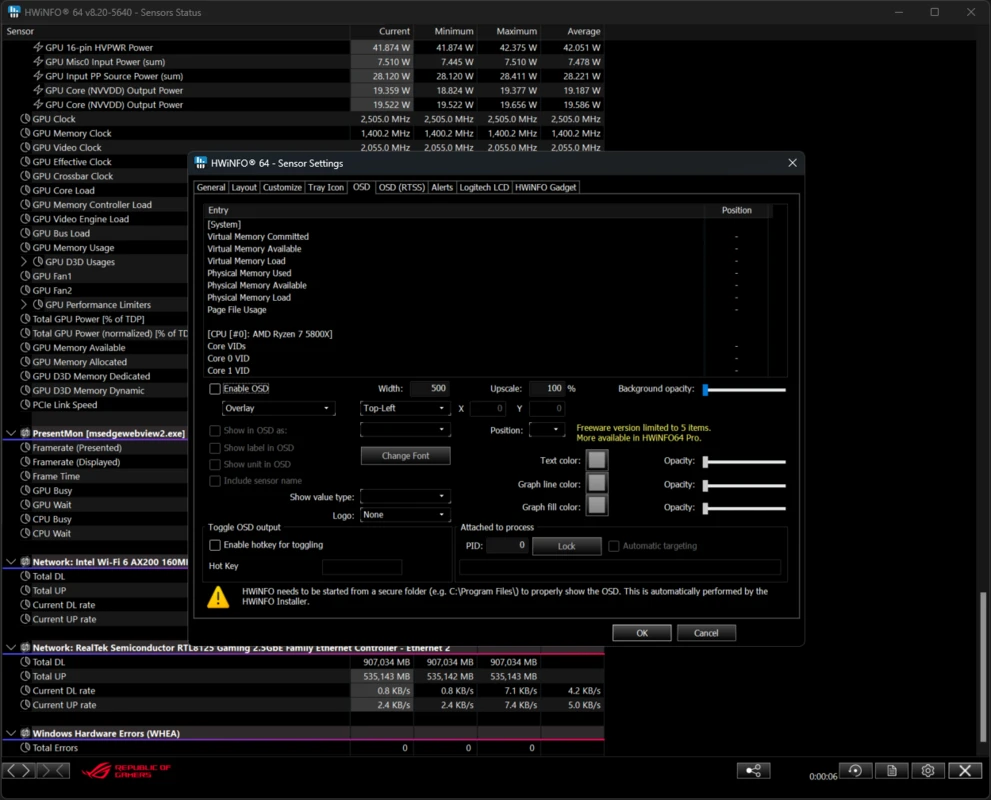
| OSD overlay items | 5 items | Unlimited |
| Remote monitoring | No | Yes |
| Commercial use | 14-day eval only | Licensed |
| JSON/YAML logging | Yes (64-bit) | Yes |
Who needs Pro?
- + PC repair and warranty service centers
- + Corporate IT asset inventory teams
- + System builders selling pre-built machines
- + Data center and server room monitoring
- + Hardware reviewers in commercial publications
Personal home use, hobby overclocking, and non-paid community support remain free. See the FAQ licensing section for common questions.
Privacy
Privacy and data handling
HWiNFO operates primarily as a local diagnostics tool. Sensor readings, hardware inventory, and exported reports are stored on your machine. The application does not upload telemetry, usage analytics, or sensor data to REALiX servers by default.
Optional features that involve network activity include email alert delivery (configured by you with your SMTP settings) and HWiNFO Pro remote sensor monitoring (reads data from networked PCs you authorize). Neither feature activates without explicit configuration.
This website at hwinfo.co does not require account registration. Standard web server logs may record IP addresses and page requests for operational purposes. No personal sensor data is collected through browsing this site.
- Stored locally
- Configuration INI, sensor logs, exported reports, and cached hardware data.
- Never collected
- Keystrokes, browsing history, personal files, or background telemetry by default.
Ready to verify and download?
Get HWiNFO 8.52 from the download page. Confirm the REALiX signature before installing.
Go to download page